
How to Timestamp a Document or File as Proof
By Tanya M. Lawson, founder of CREATORSEAL · October 13, 2026
You're about to send a file. A contract draft, a pitch deck, a set of mockups, a manuscript, a song demo, a course, or something else you have been working on.
Before it leaves your hands, you want a record that this version — the exact one on your screen right now — existed today. Not a note in a folder. Not a file date you can edit later. Something another person could verify if the date or the file were ever questioned.
That is what trusted timestamping is meant to do. It is the proof of existence idea put to work: identify the exact file, bind that identity to trusted time evidence, and preserve enough information for someone else to verify the record later.
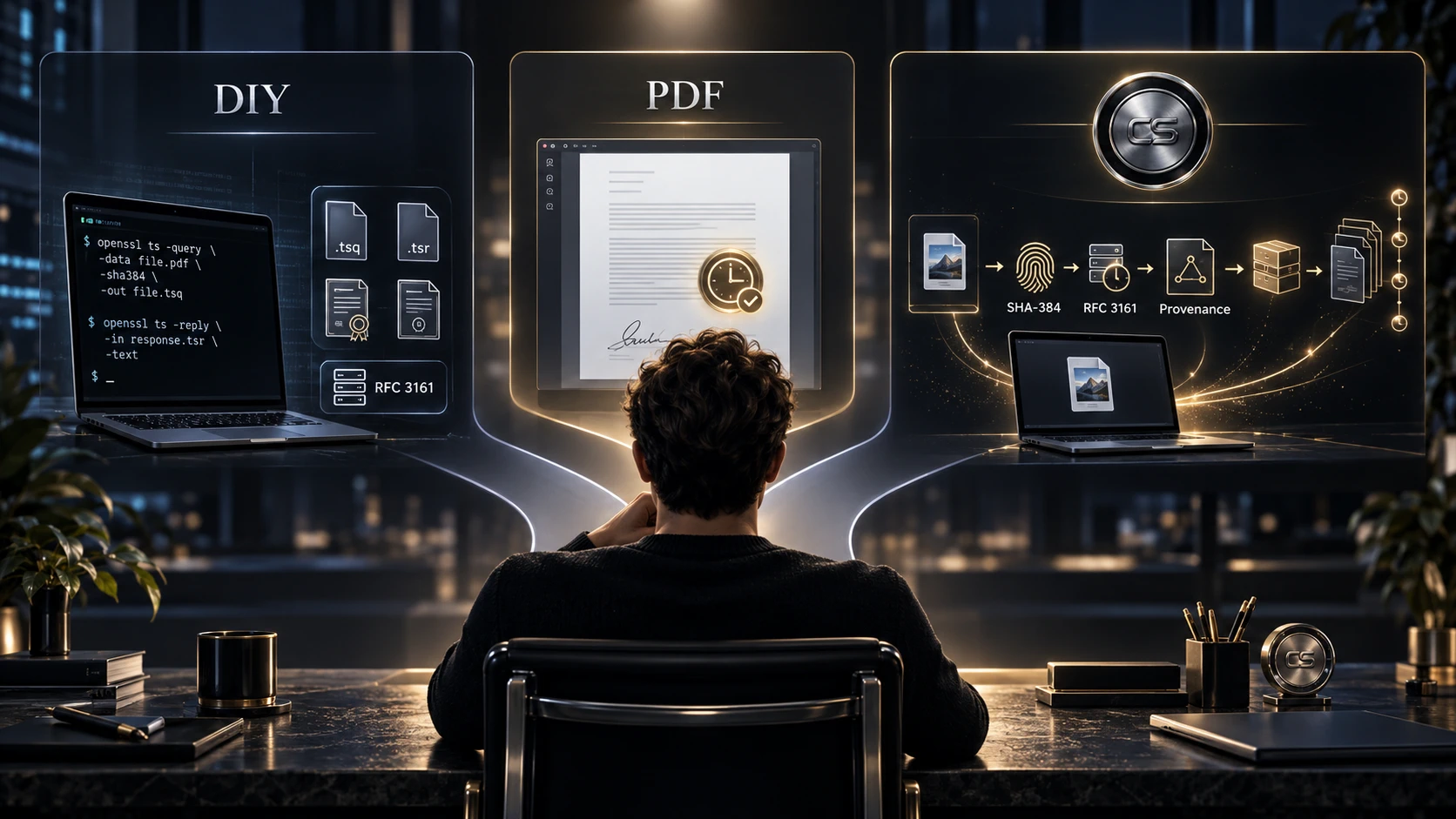
The important thing to understand is that there is more than one legitimate way to do this. The timestamp can be built by hand with command-line tools and a public RFC 3161 server. PDF software handles it where the PDF itself is the record that matters. Or CREATORSEAL wraps the timestamp inside a fuller creation-provenance workflow.
The cryptography is not the product. The workflow around the evidence is where the difference shows up.
The Short Answer
To timestamp a document properly, hash the file on your own device, send only that fingerprint to an independent RFC 3161 Time-Stamping Authority, and preserve the signed timestamp token with the original file and the verification material needed to check it later.
That basic job can be done more than one way.
Anyone comfortable with OpenSSL and willing to maintain the timestamp artifacts can do it for free. Where only a PDF matters, some PDF tools add trusted timestamps or timestamped digital signatures directly to the document. For a repeatable evidence workflow across drafts, source files, revisions, and different file types, CREATORSEAL is built for that broader job.
First, the Thing That Isn't a Trusted Timestamp
Typing a date onto a document is not trusted timestamping. Neither is relying on the "date created" field in your file system.
Those records can be useful for ordinary organization, but they are not tamper-evident evidence on their own. A visible date can be changed. File-system dates can change when a file is copied or moved. EXIF metadata can be edited. The problem is not that those records are worthless; it is that the date ultimately comes from a system or person who can alter it.
The distinction is easier to see side by side:
| Method | What it records | Who vouches for the date |
|---|---|---|
| Visible date on the page | The date someone typed | Nobody |
| File "date created" | When this copy appeared on this disk | Nobody |
| EXIF capture date | What the camera claims | Nobody |
| Cloud version history | When your account saved a version | Your cloud provider |
| RFC 3161 timestamp | That the fingerprint for this exact file existed at this time | An independent third party |
The last row matters because the trusted time does not come from you or your computer's clock. That independent source is what makes the timestamp useful as evidence.
This is also why mailing a copy to yourself is a weak way to document a digital work. A postmark may show that an envelope moved through the mail, but it does not independently bind trusted time to the exact digital file inside it.
Visible date stamps still have a purpose. They can be useful on a client presentation, a proof copy, or a social post. Just keep the original file and do not confuse the visible date with an independently verifiable timestamp.
Three Ways to Timestamp a Document or File
There is no single method everybody needs. The right choice depends on what you are trying to preserve and how much of the evidence process you want to manage yourself.
Option 1: Do It Yourself With OpenSSL and a Free RFC 3161 Server
For an RFC 3161 timestamp and nothing more, anyone comfortable with command-line tools can create one without CREATORSEAL.
The underlying cryptography is not proprietary.
The basic workflow is straightforward in concept. First, create a cryptographic hash of the file locally. Then create an RFC 3161 timestamp request for that fingerprint. Send the request to a compatible Time-Stamping Authority. Save the signed response. Finally, preserve the original file, the timestamp request, the returned token, the certificate chain, and anything else needed to verify the record later.
OpenSSL can handle the hashing, timestamp request, and verification steps. A public or free timestamp server can provide the independent time assertion. FreeTSA runs one, and these are the commands from its own documentation.
Create the timestamp request. The file is hashed locally here, so only the digest leaves your machine:
openssl ts -query -data mydocument.pdf -no_nonce -sha384 -cert -out mydocument.tsqSend the request to the Time-Stamping Authority:
curl -H "Content-Type: application/timestamp-query" \
     --data-binary '@mydocument.tsq' \
     https://freetsa.org/tsr > mydocument.tsr
Fetch the certificates once and keep them, because verification depends on them years from now:
curl -o tsa.crt    https://freetsa.org/files/tsa.crt
curl -o cacert.pem https://freetsa.org/files/cacert.pem
Verify the result:
openssl ts -verify -in mydocument.tsr -queryfile mydocument.tsq \
     -CAfile cacert.pem -untrusted tsa.crt
A successful run prints Verification: OK. OpenSSL may also print a warning that the certificate in tsa.crt "is not a CA cert" — that is expected, because it is the signing certificate rather than an authority certificate, and verification still succeeds. To read the recorded time in plain text:
openssl ts -reply -in mydocument.tsr -textThen store five things together: the original file, the .tsq request, the .tsr token, and both certificate files. Lose the original and you can no longer prove that the missing file matches the timestamped fingerprint. Lose the verification material and independently checking the record years later can become more difficult.
This route can produce legitimate timestamp evidence.
Its weakness is not the cryptography. The burden is on you.
You have to know which files to keep. You have to preserve the right verification material. You have to remember how to verify the record later. You have to repeat the process consistently when the work changes. And if you are sealing twenty versions over six months, you have to keep those records organized well enough that another person can understand what they are looking at.
If you are comfortable doing all of that, the DIY route may be enough.
That is an important point because a good guide should not pretend you need a paid product merely to obtain trusted time evidence. You do not.
What you are paying for with a managed system is everything around that raw timestamp.
Option 2: Digitally Timestamp a PDF
If the PDF itself is the final record that matters, PDF software may be the simplest route.
Some PDF applications can use trusted timestamp servers as part of a digital-signature or document-certification workflow. In that situation, the timestamp becomes associated directly with the PDF and can be useful when the document itself is what you need to preserve.
This works well for things like finalized contracts, signed forms, reports, certificates, and other documents where the PDF is the artifact everyone will continue to use.
The limitation is scope.
A PDF timestamp tells you about the PDF. It does not automatically preserve the Photoshop file that produced the design, the Word manuscript behind the exported document, the DAW session behind the audio, the source project behind the video, or the earlier drafts that show how the work developed.
If the PDF is all that matters, that may be perfectly fine.
Where the creative process matters too, the export alone is not enough.
Option 3: Use CREATORSEAL for the Evidence Workflow
CREATORSEAL takes the same basic cryptographic idea and wraps a repeatable evidence workflow around it.
When you seal a file, a SHA-384 cryptographic fingerprint is generated locally in your browser, so the original file itself is not uploaded. That fingerprint receives RFC 3161 time evidence from DigiCert, the independent Time-Stamping Authority CREATORSEAL uses. The fingerprint, timestamp token, and verification material are then organized into records you can keep: a Receipt of Provenance Record and an Evidence Bundle.
Sealing a file requires a free account. Checking a record does not — anyone can verify one at /verify without signing in, which is the point of keeping the format standards-based.
The difference is not that CREATORSEAL invented hashing or trusted timestamps. It did not.
The difference is what happens around them.
There is no timestamp request to build by hand. No certificate files to match up with the right response. No folder of unexplained .tsq, .tsr, hash, certificate, and verification files to maintain and hope you still understand a year later.
And when the work changes, later versions can be sealed separately so individual timestamps become part of a creation history rather than a collection of disconnected records.
If you are comfortable building and maintaining that evidence package yourself, you may not need CREATORSEAL.
If you want the process to become a habit instead of a cryptography project, that is the problem CREATORSEAL is designed to solve.
Which Timestamping Method Should You Use?
If you need one occasional timestamp, understand OpenSSL, and are comfortable preserving and verifying the artifacts yourself, the DIY route may be enough.
If the final PDF is the only artifact that matters, a PDF-specific timestamping workflow may fit the job better than a broader provenance system.
If you routinely share drafts, source files, manuscripts, designs, decks, project files, or other evolving creative work and want the timestamps organized into an evidence trail that somebody else can verify, CREATORSEAL is built for that workflow.
None of those answers makes the others invalid.
The point is to match the tool to the evidence problem you actually have.
A Timestamp Is One Piece. A Provenance Record Is the Whole Picture.
A timestamp answers a narrow but useful question: did the fingerprint for this exact file exist by this time?
Creative work rarely happens in one file on one day. A project moves through drafts, revisions, exports, client copies, working files, and final versions. A timestamp becomes more useful when it sits inside a record of that progression.
The sequence looks like this:
- File: the work as it exists at that moment.
- Fingerprint: a SHA-384 hash identifying those exact bytes.
- Trusted time evidence: an RFC 3161 timestamp showing that fingerprint existed by a particular time.
- Record: the fingerprint, token, and verification material preserved together.
- Revision: a later version sealed separately.
- Creation history: the sequence of sealed versions showing how the work developed.
- Evidence trail: the records kept in a form another person can examine and verify.
One timestamp is a dated snapshot. A sequence of sealed versions can show version lineage and a developing creation history.
That is where a provenance workflow becomes different from simply obtaining a timestamp.
CREATORSEAL is built for that second job.
None of this proves who created the work or who owns it. What it gives you is documentation: an evidence trail you can point to instead of relying entirely on memory.
What to Look for in a Timestamp
Whatever method you use, a few characteristics matter more than the brand name on the tool.
Look first for a recognized standard. RFC 3161 is the established protocol for trusted timestamping, later updated by RFC 5816. A standards-based timestamp can be checked with compatible tools rather than depending entirely on the service that created it.
The Time-Stamping Authority should also be independent. The trusted time should come from a third party rather than your own device clock or a date you chose yourself.
Local hashing matters when privacy matters. If the fingerprint is generated on your own device, the service does not need the original unpublished file merely to create the timestamp request.
Verification should also be possible by someone other than you. A client, platform, reviewer, attorney, or other third party should be able to check the record without needing your private account.
Finally, preserve what will be needed later. The original file matters because future verification requires hashing it again and comparing that fingerprint with the preserved record. The timestamp token and supporting verification material should stay with it.
Which File Should You Actually Timestamp?
When the working file is what best documents the creative process, consider timestamping the source file rather than only the final export.
A flattened PDF or JPEG shows an outcome. A layered design file, project file, source document, or DAW session may show much more of the underlying work. If authorship or chronology is ever questioned, those working materials can provide important context.
A timestamp does not prove who made those files, but it can document that those exact files existed by a particular time. For more on the distinction, see what proof of authorship actually involves.
Where it matters, preserve both the master file and the version you actually sent.
There is one practical detail worth remembering: hashes are byte-exact. Re-saving a document can change its bytes even when nothing appears different on the screen. If the bytes change, the hash changes too. Timestamp the exact state you intend to preserve, and keep that original file.
What a Timestamp Does and Doesn't Show
This distinction matters because timestamping is often oversold.
A valid timestamp can support the proposition that the fingerprint corresponding to an exact sequence of bytes existed no later than the recorded time. The trusted time comes from the Time-Stamping Authority rather than your own clock, and later changes to the file become detectable because the changed file will no longer produce the same fingerprint.
A timestamp does not tell you who created the file, nor who owns the copyright. It cannot establish that you were the first person in the world to create similar material. And it prevents nobody from copying your work.
A timestamped record is documentation.
It can support a conversation with a client, a platform, an attorney, or another decision-maker by giving them something concrete to examine. It does not settle a dispute by itself, and no responsible evidence tool should promise that it does.
Common Questions
Can I timestamp a document for free?
Yes. If you are comfortable with command-line tools, you can use OpenSSL to create and verify an RFC 3161 timestamp request with a compatible free or public Time-Stamping Authority. The timestamp itself is not the hard part. The responsibility for preserving the request, response, certificates, original file, and verification process stays with you.
How do I digitally timestamp a PDF?
A PDF can be timestamped through software that supports trusted timestamp servers or timestamped digital signatures. This is useful where the PDF itself is the artifact worth preserving. If the source material behind the PDF matters too, consider preserving and timestamping those original working files separately.
Is a timestamped file tamper-proof?
No — tamper-evident. Nothing physically prevents somebody from changing the file. What changes is that the alteration becomes detectable because the changed file produces a different fingerprint and no longer matches the timestamped record.
Can a timestamp be backdated?
Not by you, which is the point. The trusted time is asserted and signed by the Time-Stamping Authority rather than taken from your computer's clock. That independent time source is what distinguishes it from an ordinary file date.
Do I have to upload my file?
Not when hashing happens locally, as it does with CREATORSEAL. Only the fingerprint is transmitted for timestamping. SHA-384 is designed to be one-way, so the original file cannot practically be reconstructed from the fingerprint. The contents of the file remain on your device.
How long does the proof last?
The timestamp token does not simply become invalid because the TSA certificate later expires. Long-term verification depends on preserving the original file, the timestamp token, the certificate chain, and the other verification material needed to establish that the timestamp was valid when issued. Keep the complete verification package with the original file. For records that must remain independently verifiable over very long periods, additional archival timestamping may be appropriate.
Is CREATORSEAL just a timestamping tool?
No. The RFC 3161 timestamp is one component. A CREATORSEAL proof record also preserves the SHA-384 fingerprint and verification material, includes a Receipt of Provenance Record and an Evidence Bundle, and can be used across later versions to build a creation history.
Does this replace registering my copyright?
No. Registration is a legal filing with its own consequences. For U.S. works, registration is generally required before filing an infringement suit, while timely registration can preserve eligibility for statutory damages and attorney's fees. A timestamp is documentation you can create quickly and repeatedly. Different jobs. See Do I Need to Register My Copyright?.
If this clicked, try it on one real file before you share it.
Sources
- RFC 3161, Internet X.509 PKI Time-Stamp Protocol — rfc-editor.org
- RFC 5816, ESSCertIDv2 Update for RFC 3161 — rfc-editor.org
- NIST FIPS 180-4, Secure Hash Standard (SHA-384) — nvlpubs.nist.gov
- DigiCert, RFC 3161 compliant Time Stamp Authority server — knowledge.digicert.com
- 17 U.S.C. §§ 411–412, registration and remedies — law.cornell.edu
Related guides: How proof works · Proof of existence · Verify a proof record · How to seal a file · Glossary: RFC 3161, TSA, SHA-384 · Do I need to register copyright? · CREATORSEAL vs poor man's copyright
CREATORSEAL is not a legal service and does not replace copyright registration, contracts, NDAs, or legal counsel. It helps creators create and preserve proof records for digital files so they can maintain a clearer documentation trail.
This article is educational and is not legal advice. Copyright law varies by country.